The Ultimate Guide to Choosing the Right External Storage Drive
Selecting the perfect external storage drive requires balancing speed, durability, capacity, and price. Whether you need ultrafast performance for video editing or rugged reliability for field photography, this guide breaks down the best options for every scenario. We analyze top drives from leading manufacturers like Western Digital, Seagate, Samsung, and LaCie to help you make an informed decision based on your specific needs and budget.
In today's data-driven world, external storage drives have become essential tools for professionals and casual users alike. Whether you're a video editor needing lightning-fast transfer speeds or a photographer requiring rugged backup solutions in the field, choosing the right drive can significantly impact your workflow and data security. This comprehensive guide examines the best external storage options available, helping you navigate the complex landscape of hard drives and solid-state drives to find the perfect match for your specific requirements.
Understanding Your Storage Needs
Before selecting an external drive, it's crucial to assess your specific requirements. Different use cases demand different features. Video editors and content creators typically prioritize speed above all else, needing drives that can handle large file transfers and real-time editing of high-resolution footage. Photographers and field professionals often require rugged, portable drives that can withstand travel and environmental challenges. For general backup purposes, reliability and cost-effectiveness become the primary considerations. Understanding these distinctions will help you avoid overspending on unnecessary features or compromising on critical performance aspects.
Best Drives for Different Use Cases
For Reliable Backups: Western Digital Elements Desktop
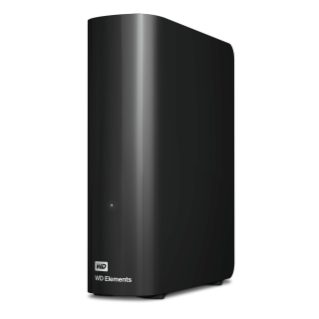
When it comes to dependable, cost-effective backups, the Western Digital Elements Desktop Hard Drive stands out as an excellent choice. According to testing data from WIRED, these drives offer reliable performance at competitive prices, with storage options reaching up to 20 terabytes. While transfer speeds average around 120 megabytes per second—not the fastest available—this is more than sufficient for overnight incremental backups. The drives use USB-C with USB 3 support and work seamlessly across Windows, macOS, and Linux systems. For those seeking alternatives, Seagate's Expansion series offers similar reliability at comparable price points.

For Maximum Speed: Thunderbolt and USB4 Options
For professionals requiring blistering transfer speeds, Thunderbolt 5 and USB4 drives represent the cutting edge of external storage technology. LaCie's Rugged SSD Pro5, featuring Thunderbolt 5 connectivity, delivers read/write speeds up to 6,700 MB/s and 5,300 MB/s respectively—fast enough for real-time editing of 8K and 6K RAW footage. For those without Thunderbolt 5 devices, Corsair's EX400U SSD offers impressive Thunderbolt 4 performance with speeds around 3,800 MB/s for sequential reads. These drives come at premium prices but provide unmatched performance for video editors and content creators working with massive files.
For Photographers and Field Work
Photographers and professionals working in challenging environments need drives that combine portability with durability. Crucial's X9 Pro SSD hits the sweet spot with its compact size (about half a deck of cards), lightweight design (1.3 ounces), and solid performance (1,100 MB/s read/write speeds). For even more demanding conditions, OWC's Envoy Pro Elektron SSD offers rugged aluminum construction with IP67 water and dust resistance, making it ideal for outdoor photography and fieldwork. These drives balance performance with physical durability, ensuring your data remains safe during travel and challenging conditions.
Key Considerations When Choosing
SSD vs. HDD: Making the Right Choice
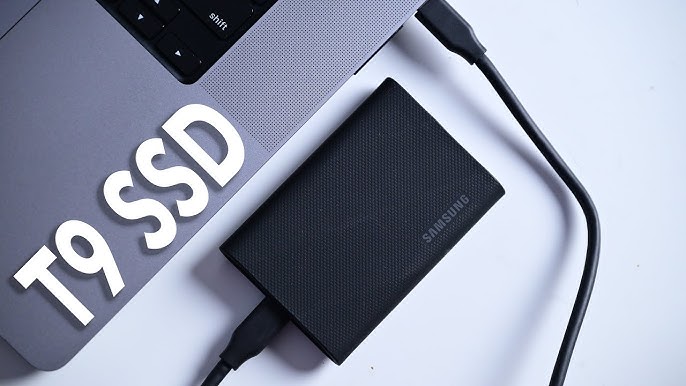
The decision between solid-state drives (SSDs) and traditional hard disk drives (HDDs) depends largely on your specific needs and budget. SSDs offer significantly faster transfer speeds, better durability (no moving parts), and smaller form factors, making them ideal for active work and portable use. However, they come at a higher cost per terabyte. HDDs provide much larger capacities at lower prices, making them perfect for archival storage and backups where speed isn't critical. As noted in industry testing, SSDs are generally recommended for any drive you'll work with regularly, while HDDs remain excellent for large-scale, infrequently accessed storage.
Reliability and Brand Considerations
When it comes to data storage, reliability should never be compromised. Industry data from companies like Backblaze, which publishes annual drive failure statistics, consistently shows that established brands like Seagate, Western Digital, Samsung, and Toshiba offer the most reliable drives. While no drive is immune to failure, sticking with reputable manufacturers significantly reduces risk. It's also worth considering drive warranties and customer support when making your selection, as these can be crucial if issues arise with your storage solution.
Practical Implementation Tips
To maximize the value and longevity of your external storage drive, proper implementation is essential. Always ensure your computer's ports support the drive's maximum speed capabilities—paying for a high-speed USB4 drive is wasteful if your laptop only has USB 2.0 ports. For backup drives, establish a consistent schedule and consider using dedicated backup software appropriate for your operating system. When using drives in the field, invest in protective cases and avoid exposing them to extreme temperatures or physical shocks. Finally, consider implementing a 3-2-1 backup strategy: three total copies of your data, on two different media, with one copy stored offsite for optimal data protection.
Future Trends and Considerations
The external storage market continues to evolve rapidly, with several notable trends emerging. Thunderbolt 5 adoption is gradually increasing, promising even faster transfer speeds for professionals. There's also a growing trend toward more compact, cable-free designs like Seagate's Ultra Compact SSD, which combines thumb-drive convenience with SSD performance. Additionally, the rebranding of certain product lines—such as SanDisk's transition from WD_Black to Optimus GX for SSDs—means consumers should pay attention to manufacturer changes when making purchasing decisions. As storage technology advances, we can expect continued improvements in speed, capacity, and durability across all price points.
Choosing the right external storage drive requires careful consideration of your specific needs, budget, and workflow requirements. By understanding the trade-offs between speed, capacity, durability, and cost, you can select a drive that perfectly matches your use case. Whether you opt for the blazing speed of Thunderbolt 5 drives, the rugged reliability of field-ready SSDs, or the cost-effective capacity of traditional HDDs, the right storage solution will enhance your productivity and protect your valuable data for years to come.