The Elusive Dream of a True Universal Remote: A Review of the Cantata Haptique RS90
The promise of a single remote controlling every gadget in your home remains compelling, but the reality is still frustratingly out of reach. The Cantata Haptique RS90, a sleek and powerful successor to the departed Logitech Harmony line, attempts to fill this void. With a modern Android platform, color touchscreen, and support for multiple control protocols, it aims to be the last remote you'll ever need. However, our review finds that confusing setup, a bewildering interface, and missing key features make it a device only suitable for the most patient and dedicated tech enthusiasts, falling short of the universal control utopia it promises.
The vision of a single, elegant remote that seamlessly commands every entertainment and smart home device is a persistent dream in consumer technology. With the demise of Logitech's Harmony line, that dream seemed to fade, leaving a gap for tech enthusiasts with mixed ecosystems of legacy and modern gadgets. Enter the Cantata Haptique RS90, a bold and beautiful contender promising to pick up the mantle. Priced at $406, it boasts a sleek aluminum design, a color touchscreen, and the computational power of a smartphone, running on Android 12. But as our review based on testing reveals, this remote, while packed with potential, demonstrates that the day of effortless, whole-home control is not today. It remains a complex piece of hardware that struggles with the very universality it claims to offer.
A Hardware Masterpiece with Powerful Internals
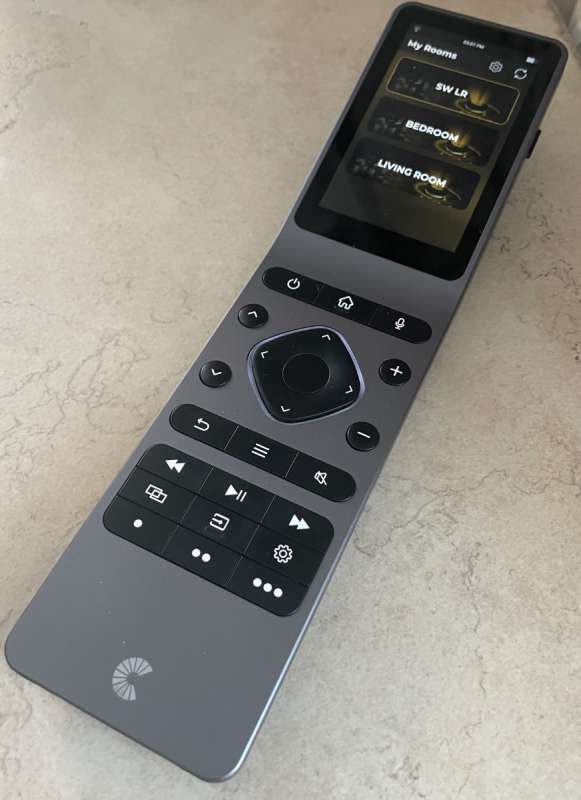
From a design and build perspective, the Haptique RS90 is immediately impressive. It abandons the cluttered, plastic aesthetic of traditional remotes for a sleek, angled aluminum chassis that feels premium. The device features a backlit 24-button keypad on the lower half and a 3.1-inch color touchscreen on top, housing an IR emitter. Its computational specs are noteworthy: an ARM Octacore processor, 3 GB of RAM, 16 GB of storage, and Bluetooth and Wi-Fi connectivity. It includes a built-in microphone, speaker, and a charging cradle, positioning itself as a modern, connected device rather than a simple infrared blaster.
The Setup Hurdle: A Confusing Foundation
The initial promise quickly meets reality during setup. The process relies on the Haptique Config smartphone app, which, while well-designed visually, introduces immediate complexity. Unlike the intuitive Harmony system, adding devices requires navigating ambiguous categories. For example, an Apple TV might be found under "Media Box" or "Media Player" but not "Set Top Box," and an Nvidia Shield is categorized as a "Smart TV." This inconsistency forces users to guess, turning what should be a straightforward process into a trial-and-error session. The app's claimed support for over 6,200 brands also doesn't always match the reality within the configuration tool, where selections can be surprisingly limited.
Navigational Bewilderment on the Device Itself
If setup is challenging, daily use is where the RS90's flaws become most apparent. The remote's interface organization is confusing, diverging from the app's logic. It uses three primary home screens: Groups, Macros, and Rooms. Finding your devices isn't intuitive, as they aren't directly accessible from a main menu; instead, they must be nested within created "Rooms." Navigation is inconsistent: some actions require a tap, others a long-press. The directional pad and buttons can become remapped depending on the active screen, forcing users to long-press the back button to return home. Controlling a system like Sonos exemplifies the frustration, requiring a clumsy mix of touchscreen taps and physical keypad presses that is never explained clearly.
Critical Feature Gaps and Missing Polish
Several omissions significantly hinder the RS90's goal of being a universal solution. A glaring absence is a one-button help function—a cornerstone of the Harmony experience that walked users through fixes when commands failed. The RS90 offers no such safety net. Furthermore, advertised features like using the microphone for Siri commands with an Apple TV are not yet functional, currently limited to select Samsung and LG TVs. The documentation, both in the included PDF and online manual, is often outdated and inaccurate, referencing features that don't work as described. This lack of polish extends to the software, where users can occasionally find themselves in raw Android system menus to adjust settings.
Who Is This Remote For?
Given its current state, the Cantata Haptique RS90 is not a product for the general consumer or even the average tech enthusiast. Its $406 price tag demands a seamless experience it cannot yet deliver. It is a device for the ultra-dedicated tinkerer—someone who enjoys the process of configuration, can tolerate inconsistency, and is willing to overlook significant software shortcomings for the sake of beautiful hardware and future potential. For everyone else, the complexity outweighs the convenience.
Conclusion: Potential Unrealized
The Cantata Haptique RS90 embodies the ongoing struggle to create a truly universal remote. It is a powerful, beautifully crafted piece of hardware that, on paper, has everything needed to control a modern smart home. In practice, however, it is hamstrung by confusing software, a non-intuitive interface, missing critical features, and unreliable documentation. It proves that computational power and multiple wireless protocols are not enough; user experience is paramount. While it has the potential to improve with future software updates, as of today, it cannot claim the vacant universal remote throne. For now, the dream of one remote to rule them all remains just that—a dream, deferred by complexity and waiting for a more polished, user-centric execution.