The Essential Guide to Choosing the Best Home Printer for Your Needs
While the digital age has reduced our reliance on physical documents, a reliable home printer remains an essential tool for many households and home offices. This guide breaks down the key considerations—ink tank vs. laser, connectivity, and scanning capabilities—to help you select the right printer. Based on extensive testing, we highlight top-performing models for various needs, from the cost-effective Epson EcoTank for most users to powerful laser options for high-volume printing. Whether you're printing shipping labels, school assignments, or office documents, understanding your specific requirements is the first step to finding a printer that works seamlessly without frustration.
In an era dominated by digital screens, the humble home printer might seem like a relic. Yet, for tasks ranging from printing shipping labels and boarding passes to school projects and office documents, having a reliable printer at home remains a practical necessity. The challenge lies in navigating a market filled with confusing terminology—inkjet, laser, tank, cartridge—to find a machine that works consistently without becoming a source of frustration. This guide synthesizes hands-on testing and key insights to help you cut through the noise and select the best home printer for your specific needs, balancing print quality, cost efficiency, and ease of use.
Key Printer Technology Decisions: Ink vs. Laser
Your first major decision is choosing between inkjet and laser technology, each with distinct advantages and limitations. Understanding this core difference is crucial for long-term satisfaction and cost management.
Inkjet Printers: Versatile and Common
Inkjet printers, the most common type for home use, work by propelling tiny droplets of liquid ink onto paper. They excel at printing high-quality color photos and graphics. Within this category, you now primarily find two subtypes: traditional cartridge-based models and newer ink tank systems. Cartridge models are familiar but often have a higher cost per page and generate more plastic waste. Ink tank printers, like those in Epson's EcoTank line, use large, refillable reservoirs of ink. They represent a significant shift, offering dramatically lower printing costs and reduced environmental impact, though they require a more involved initial setup and should remain stationary to prevent leaks.
Laser Printers: Speed and Efficiency for Text
Laser printers use a dry powder (toner) and a heating process to fuse images onto paper. They are typically faster than inkjets, especially for black-and-white documents, and have a much lower cost per page over time. Pages emerge dry and slightly warm. The primary limitation is paper compatibility; the heat process can melt certain specialty papers like windowed envelopes or some photo papers. For households or home offices that print primarily text documents in volume, a laser printer is often the most reliable and economical choice.
Essential Features to Consider
Beyond the core technology, several features will determine how well a printer integrates into your daily life. Prioritizing these based on your habits will prevent future headaches.
Connectivity: Wi-Fi is Nearly Essential
Modern home networks make Wi-Fi connectivity a highly desirable, if not essential, feature. It allows you to place the printer anywhere within range and print from multiple devices—laptops, phones, and tablets—without cables. While some budget models may only offer USB, and others include Ethernet for a wired network connection, Wi-Fi provides the greatest flexibility for most users.
Scanning and Copying: The All-in-One Advantage
Many printers now function as all-in-one devices, incorporating a flatbed scanner and copier. If you occasionally need to digitize documents, receipts, or photos, this built-in functionality is invaluable. It eliminates the need for a separate scanner. Higher-end models may also include an automatic document feeder (ADF), which is a major time-saver for scanning or copying multi-page documents.
Top Printer Recommendations
Based on testing for print quality, reliability, and value, here are standout models for different user profiles.
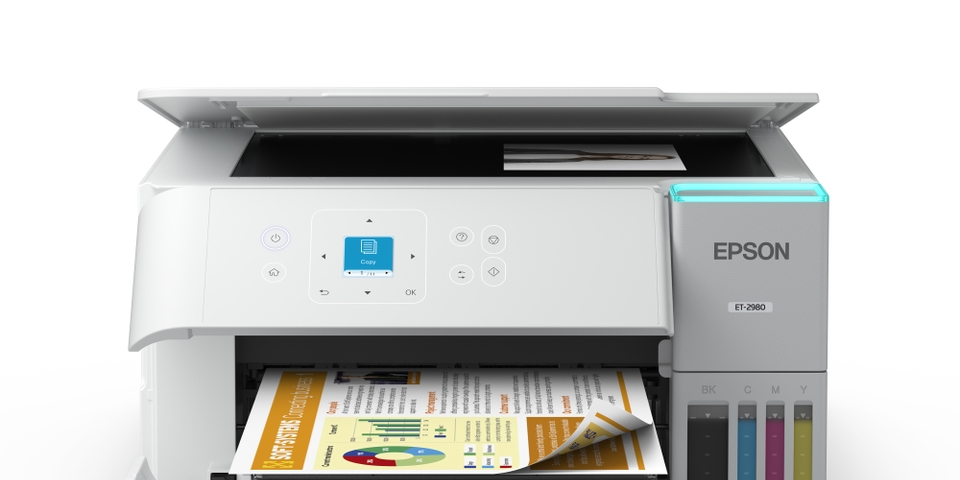
Best for Most People: Epson EcoTank ET-2980
The Epson EcoTank ET-2980 strikes an excellent balance for the average household. As an ink tank model, it offers very low printing costs after the initial investment. Setup is straightforward with keyed ink bottles to prevent spills. It includes a flatbed scanner/copier, making it a fully featured all-in-one. While its paper capacity is lower than some lasers, its print quality is excellent for both documents and occasional photos, making it a versatile and cost-effective champion for general home use.
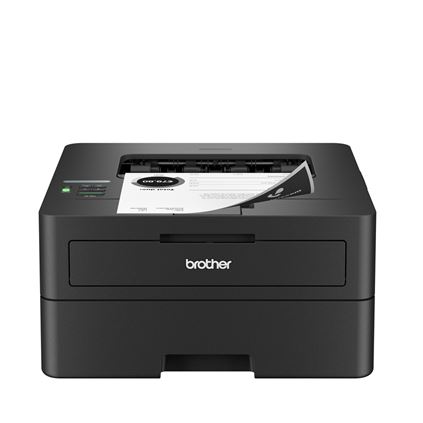
Best Black-and-White Laser: Brother HL-L2460DW
For home offices or students who primarily print text, the Brother HL-L2460DW is a workhorse. This monochrome laser printer is fast, quiet, and extremely economical to run. Its compact design fits easily on a shelf, and once set up (which involves a basic interface for Wi-Fi configuration), it requires minimal intervention. If your printing needs are dominated by black-and-white documents and you rarely need color or scanning, this model delivers outstanding performance and value.
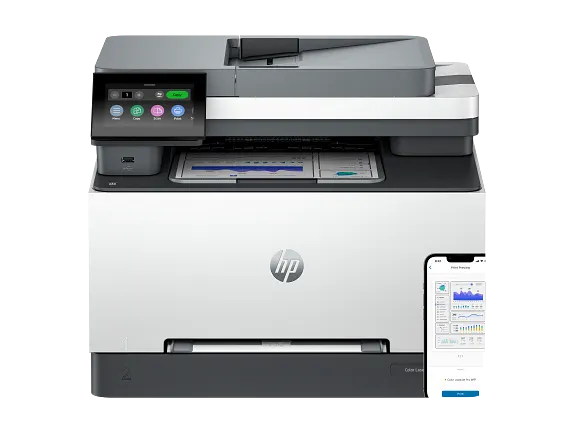
Best for a Home Office: HP Color LaserJet Pro MFP 3301sdw
When a home office demands professional-grade color printing, scanning, and copying, the HP Color LaserJet Pro MFP 3301sdw is a top contender. This color laser all-in-one is fast, supports various connectivity options (dual-band Wi-Fi, Ethernet, USB), and is designed for shared use. It includes a flatbed scanner and an automatic document feeder, handling diverse tasks efficiently. It represents a higher upfront investment but pays off in productivity and low cost-per-page for color output.
Specialized Option: Thermal Printers for Labels
For a specific niche, thermal printers like the Munbyn RW405B offer a unique solution. These printers use heat to create images on special paper, requiring no ink or toner. They are ideal for printing shipping labels, barcodes, or simple organizational stickers. While not suitable for documents or photos, they are a perfect supplemental tool for small business owners or organized households that regularly ship packages or label items.
Making Your Final Choice
Selecting the right printer ultimately comes down to honestly assessing your habits. Consider how often you print, whether you need color or just black-and-white, if scanning is necessary, and your tolerance for ongoing costs. For most, an ink tank all-in-one like the Epson EcoTank provides the best blend of capability and cost-efficiency. For high-volume text printing, a monochrome laser is unbeatable. By aligning the technology and features with your actual needs, you can transform the printer from a potential headache into a dependable and boringly efficient tool that simply works when you need it.