
Elevating Your Professional Presence: The Essential Guide to Webcam Selection
In today's hybrid work environment, your webcam quality directly impacts your professional image. While coworkers may only see you in two dimensions, investing in the right webcam ensures you present your best self during virtual meetings. This guide explores top webcam options across different price points and use cases, from budget-friendly choices to premium models with advanced features. Learn how to enhance your video presence with proper equipment selection and setup techniques that make a significant difference in how you're perceived in virtual environments.
In today's increasingly digital workplace, your webcam has become a crucial tool for professional communication. While your coworkers may only see you in two dimensions during virtual meetings, the quality of your video feed can significantly impact how you're perceived. Many professionals rely on built-in laptop webcams, but these often fall short of delivering the crisp, professional image that makes a strong impression.
Why Upgrade Your Webcam?
Built-in laptop webcams, even on newer devices, typically deliver subpar performance compared to dedicated external webcams. According to Wired's comprehensive testing, most built-in cameras struggle with image quality, especially in challenging lighting conditions. External webcams offer superior sensors, better lenses, and advanced features that can dramatically improve your video presence.
Top Webcam Recommendations
Best Overall: Logitech Brio 505
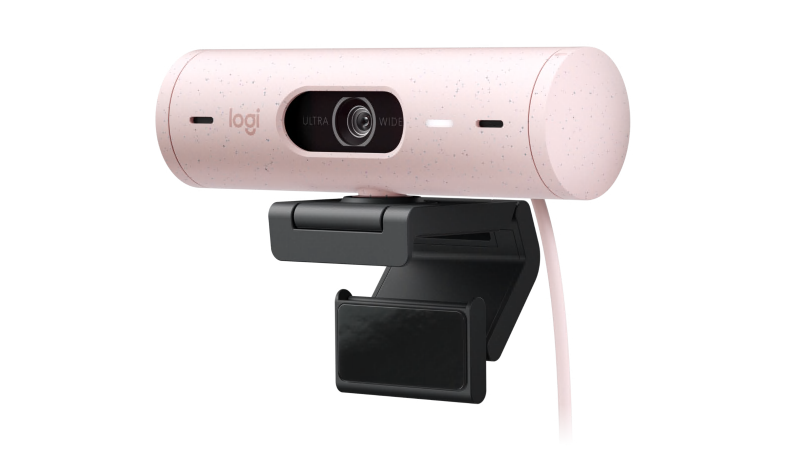
The Logitech Brio 505 stands out as the top choice for most professionals. This webcam delivers sharp 1080p video quality with a 4-megapixel sensor and features RightSight technology that automatically adjusts the frame to keep you centered. The integrated privacy shutter and easy installation make it a practical choice for daily use. As noted in Wired's testing, the adhesive mount maintains its stickiness even after repeated removal and reinstallation.

Premium Upgrade: Logitech MX Brio
For those seeking superior image quality, the Logitech MX Brio offers 4K resolution with an 8.5-megapixel Sony Starvis sensor. While most video conferencing platforms cap resolution at 1080p, the higher resolution allows for digital cropping and reframing without sacrificing image quality. The premium build quality and rotating privacy shutter dial provide both functionality and peace of mind.
Budget-Friendly Option: Anker PowerConf C200
The Anker PowerConf C200 delivers excellent value at a lower price point. With 2K resolution and a 5-megapixel sensor, this webcam provides solid video quality that outperforms most built-in laptop cameras. The dual noise-canceling microphones and companion app for customization make it a compelling choice for budget-conscious professionals.
Smartphone Alternatives
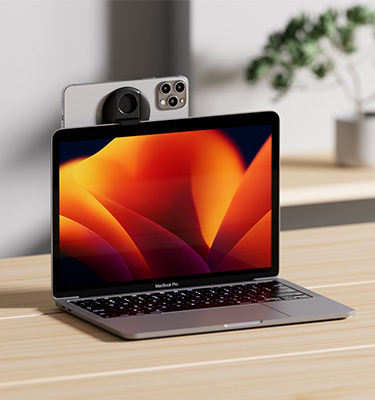
Before purchasing a dedicated webcam, consider using your smartphone's camera. Modern smartphones often feature superior camera technology compared to dedicated webcams. Apple's Continuity Camera allows iPhone users to wirelessly use their phone's camera as a webcam with compatible MacBooks. Google Pixel phones offer wired webcam support, requiring only a simple USB connection and tripod mount.
Enhancing Your Setup
Lighting Considerations
Proper lighting can dramatically improve any webcam's performance. Webcams have small sensors that require adequate light to produce quality images. Simple LED panels like the Lume Cube Mini can provide adjustable brightness and color temperature to match your environment. Positioning the light source to illuminate your face evenly eliminates shadows and creates a more professional appearance.
Audio Quality
While webcams include built-in microphones, they often deliver subpar audio quality. Most laptops feature better built-in microphones, and video conferencing applications allow you to select your preferred audio input device separately from your video source. For optimal audio quality, consider investing in a dedicated USB microphone like the Logitech Blue Yeti Nano.
Making the Right Choice
When selecting a webcam, consider your specific needs and environment. For most professionals, a 1080p webcam like the Logitech Brio 505 provides excellent quality at a reasonable price. Those who frequently present or need advanced features may benefit from 4K models or PTZ (pan-tilt-zoom) cameras. Remember that your virtual presence contributes to your professional image, making a quality webcam a worthwhile investment in today's hybrid work landscape.