A Professional Guide to Running and Hiding Ethernet Cables for a Neat Home Network
Achieving faster, more stable internet throughout your home doesn't have to result in unsightly cable clutter. This comprehensive guide provides professional strategies for selecting the right Ethernet cables, planning optimal routes, and implementing effective cable management solutions. Learn how to hide cables along baseboards, under carpets, within cable raceways, or even behind walls for a clean, organized installation that maximizes your network's performance without compromising your home's aesthetics.
In an era of ubiquitous Wi-Fi, the superior reliability and speed of a wired Ethernet connection remain unmatched for critical home networking needs. Whether you're setting up a home office, optimizing a gaming setup, establishing wired backhaul for a mesh system, or connecting smart home devices, running Ethernet cables provides a permanent solution for fast and stable internet. However, the prospect of visible, messy cables can be a significant deterrent. This guide, drawing on expert advice from WIRED's comprehensive tutorial, will walk you through the professional steps to boost your internet speeds with Ethernet while maintaining a neat and organized home environment.
Selecting the Right Ethernet Cables
The foundation of any good wired network is the cable itself. Not all Ethernet cables are created equal, and choosing the correct type is crucial for both current performance and future-proofing your installation.
Understanding Cable Categories
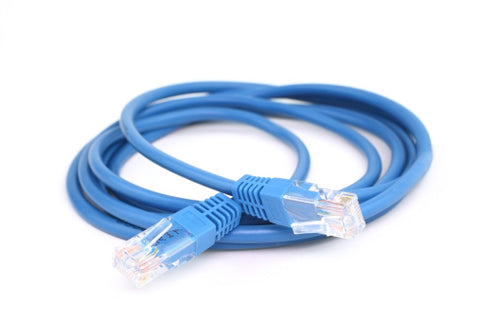
Ethernet cables are classified by "Category" (Cat), which defines their maximum bandwidth and data rate capabilities. For most home applications, Cat 5e or Cat 6 cables, which support speeds up to 1 Gigabit per second (Gbps), are sufficient. However, for primary runs—such as the connection from your internet modem to a central network switch—investing in Cat 6a or Cat 7 cables is a wise decision. These support speeds up to 10 Gbps and, while slightly more expensive, offer better shielding and will accommodate increased bandwidth demands for years to come. Categories like Cat 7a or Cat 8 (capable of 40 Gbps) are generally overkill and cost-prohibitive for residential use.
Shielding and Construction
Most common cables use Unshielded Twisted Pair (UTP) construction, where internal wire pairs are twisted to reduce interference. For runs near major sources of electromagnetic interference, like power lines, you might consider Shielded (STP) or Foiled Twisted Pair (FTP) cables. Be aware that shielded cables are less flexible and more prone to damage if mishandled. Experts often recommend avoiding flat Ethernet cables for permanent installations, as they are more susceptible to interference and physical damage compared to standard round cables.
Essential Network Hardware
Beyond the cable, a few key pieces of hardware will complete your setup. Most consumer routers have only a handful of Ethernet ports. To connect multiple wired devices, you will need an Ethernet switch. An unmanaged, plug-and-play Gigabit switch is perfect for home use. When selecting a switch, opt for one with more ports than you currently need to allow for future expansion. For instance, if you plan to run cables to four rooms, an 8-port switch provides a comfortable buffer.
Strategic Planning for Cable Runs
Careful planning is the most critical step to ensure a neat and functional installation. Before purchasing any materials, map out the entire path your cables will take from your router or switch to each endpoint.
Adhere to these key planning principles: Avoid sharp bends or kinks, as they can damage the internal wires and degrade signal quality. Route cables away from high-traffic areas where they could be crushed underfoot or by furniture. While not always a major issue, try to maintain some distance from electrical cables to minimize potential interference. Finally, invest in basic cable management from the start. A pack of reusable cable ties or a mesh cable sleeve can make bundling and organizing multiple runs significantly easier and tidier.

Professional Methods for Hiding Ethernet Cables
The true art of a neat installation lies in effectively concealing the cables. The method you choose depends on your skill level, budget, and willingness to modify your living space.
Non-Invasive Solutions
For renters or those seeking a simple approach, several effective solutions exist. Running cables along baseboards using adhesive-backed clips or nails is straightforward. For a cleaner look, use paintable cable raceways or trunking that attach to the wall and completely enclose the cables. These come in various sizes and can include corner pieces for navigating turns. Another simple method is to tuck cables under the edge of a carpet or area rug, keeping them flush against the wall to avoid becoming a tripping hazard.
More Permanent & Discreet Installations
For a truly seamless look, more involved methods are required. Installing cables behind walls or under floors offers the cleanest finish but requires tools like flexible drill bits, fish tapes, and possibly cutting into drywall. This method often involves installing low-voltage mounting brackets and wall plates with Ethernet jacks in each room, creating a professional-grade infrastructure. While more labor-intensive, it adds value and is the ultimate solution for a clutter-free home.
Final Tips for a Polished Setup
Once your cables are run, a few finishing touches will ensure long-term neatness. Label both ends of every cable as you install them. This simple step is invaluable for future maintenance, upgrades, or troubleshooting. Furthermore, consider the placement of network hardware like switches and power strips. Concealing them in a ventilated cable management box can transform a tangled mess into an organized component of your entertainment center or office nook.
By thoughtfully selecting your materials, meticulously planning your routes, and choosing a hiding method that suits your home, you can enjoy the unparalleled performance of a wired Ethernet network without sacrificing the aesthetics of your living space. The result is a faster, more reliable internet connection that works seamlessly in the background, powering your digital life efficiently and neatly.